How I got 1.22 lakh views in 7 days with an AI-made YouTube channel (full stack)
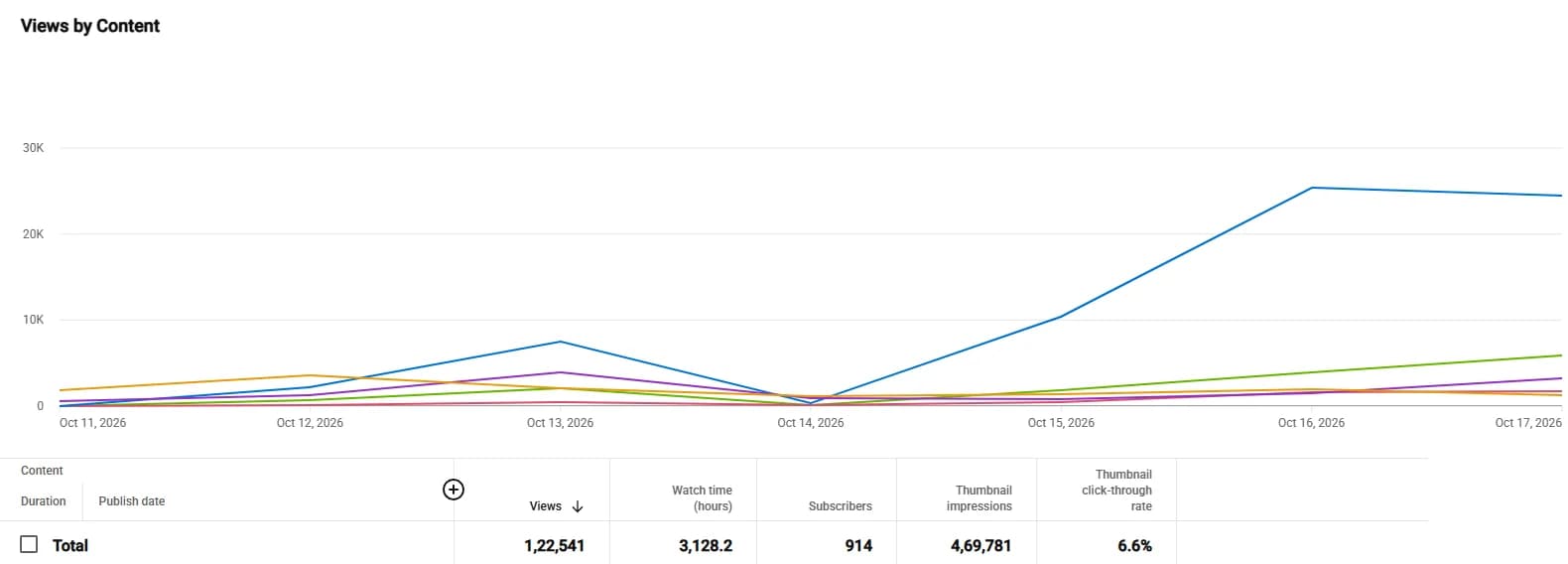
The complete AI video stack behind Bible Tales: 1,22,541 views, 3,128 watch hours and +914 subscribers in 7 days (Oct 11–17, 2026). Every pipeline stage, the models, the GPU, the quality agents and what actually drove the views.
In the 7 days from 11 to 17 October 2026, our YouTube channel Bible Tales (@BibleTalesTe) got 1,22,541 views, 3,128 watch hours and +914 subscribers. Every video on it was produced with the AI video studio I built and now set up for clients.
This post is the full stack: every stage from topic to finished film, the models we run, the GPU it runs on, the quality agents that catch mistakes, and the honest reasons the week went well. If you only want the short story and the policy lessons, read the case study.
1,22,541
views in 7 days (Oct 11–17, 2026)
3,128
watch hours in the same 7 days
+914
subscribers in the same 7 days
Key takeaways
- One series did most of the work: the top video alone had 70,445 views, 57.5% of the week.
- The studio runs 11 stages from topic to film, with a human approving the script and the final upload.
- Default mode is free and local on a 16 GB NVIDIA GPU; hybrid and full cloud modes exist for people without one.
- The real edge wasn't generation. It was quality checks and packaging (topic, title, thumbnail).
What the numbers actually say
Screenshots get shared without context, so here is the context. In that week YouTube showed our videos 4,69,781 times (impressions) and 6.6% of those impressions turned into a click. That click-through rate, together with long watch time per view (3,128 hours across 1.22 lakh views), is what kept the recommendations coming.
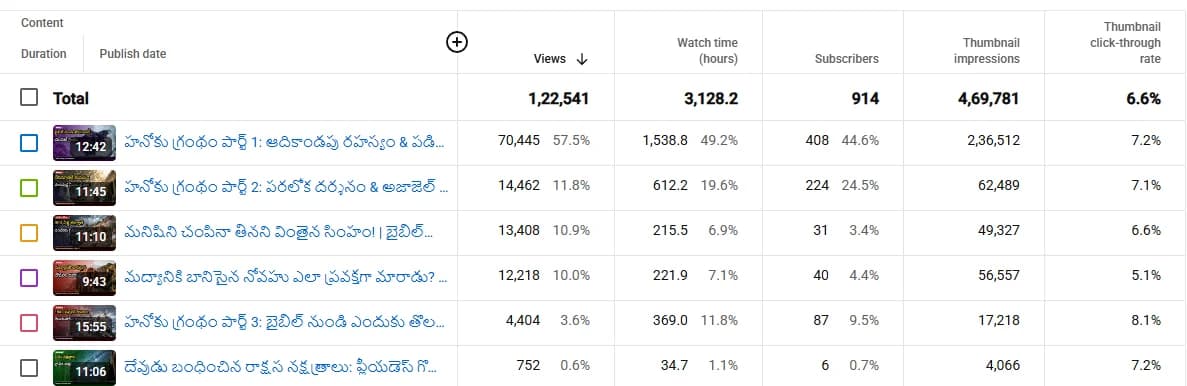
The week was carried by one series, The Book of Enoch:
| Video | Views in 7 days |
|---|---|
| The Book of Enoch, Part 1 | 70,445 (57.5% of the week, 7.2% CTR) |
| The Book of Enoch, Part 2 | 14,462 |
| The Book of Enoch, Part 3 | 4,404 |
Look at the 28-day view and you can see how sudden it was. Views were modest for weeks and then jumped once Part 1 started getting recommended.
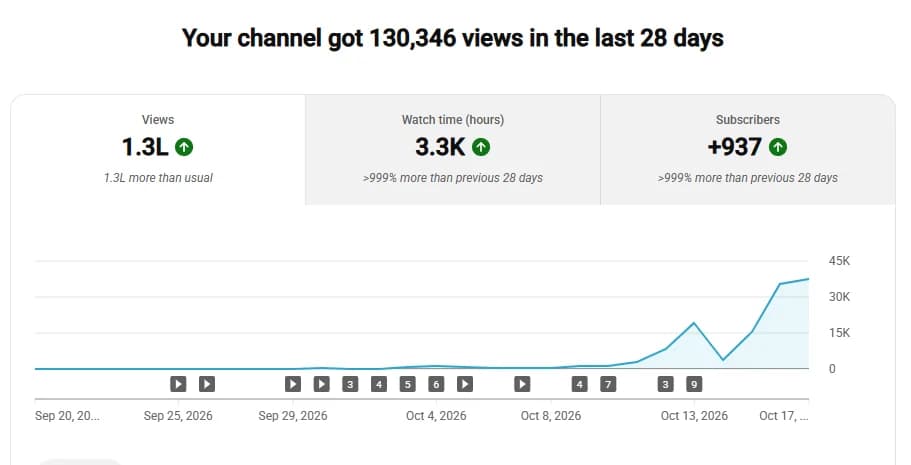
That is the first honest lesson: the pipeline makes publishing possible, but a topic people are curious about makes it work. A mystery-style series that viewers couldn't easily find in their own language beat straightforward retellings of familiar stories.
The full stack, stage by stage
You type a topic (or paste a YouTube reference) and the studio works through each stage one scene at a time. Every stage can run on a local model or a cloud model.
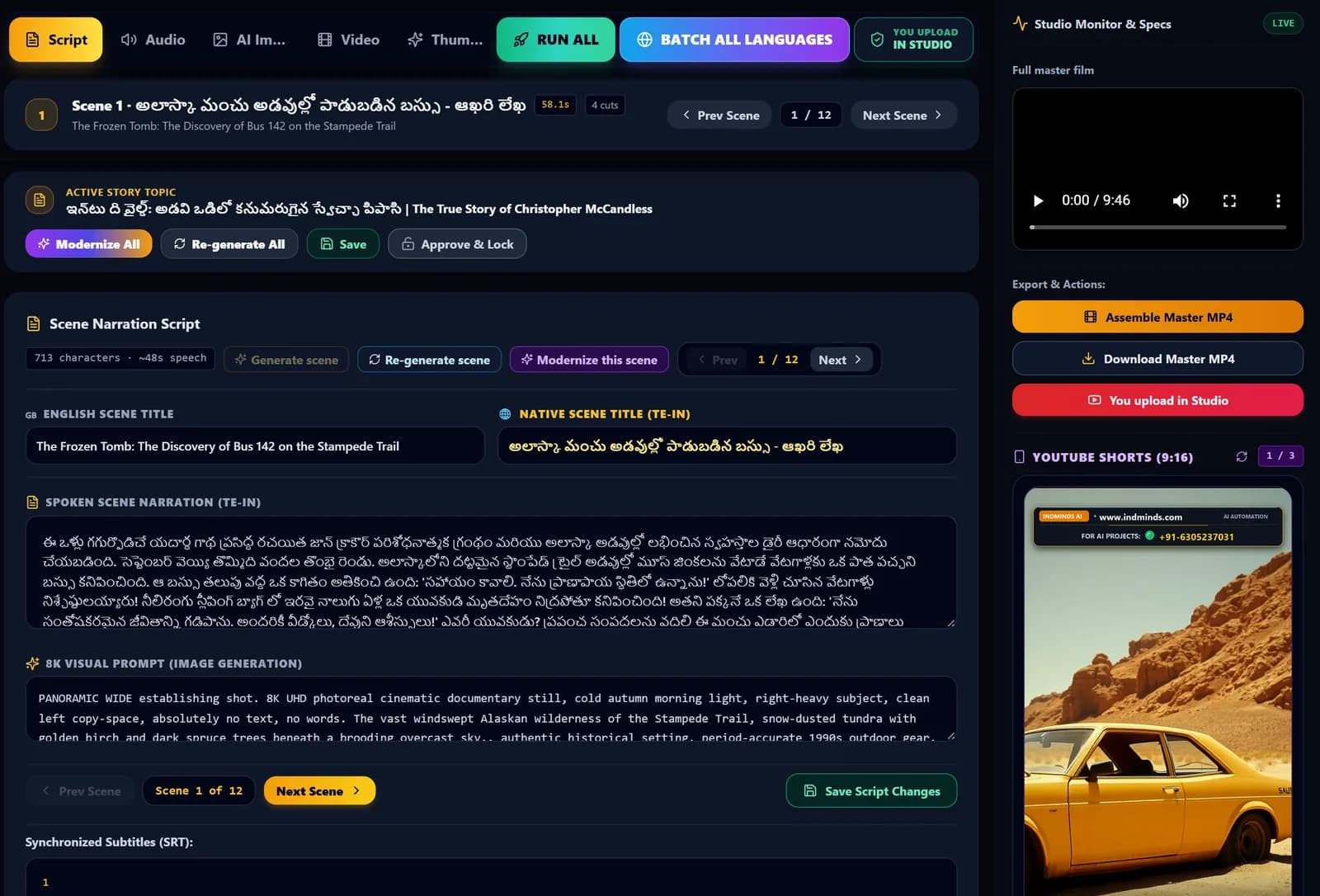
1. Script writing
The studio writes a 12-scene documentary script with scene titles. I can regenerate or "modernize" any scene, then Approve & Lock it. Locally this runs on Gemma 4 through Ollama; in the cloud it can use Grok, Claude, Gemini, OpenAI or OpenRouter.
2. Image prompts
For each scene the script engine writes a cinematic visual prompt with several distinct "cuts", so a scene isn't one static picture. Every prompt is editable.
3. AI images
The default image model is FLUX.2 Klein 4B, running on my own GPU. FLUX.1 Schnell, FLUX.1 Dev, Z-Image-Turbo and SDXL Turbo are also wired in, plus Grok, Gemini, OpenAI or OpenRouter in the cloud. One click paints one scene or all 12.
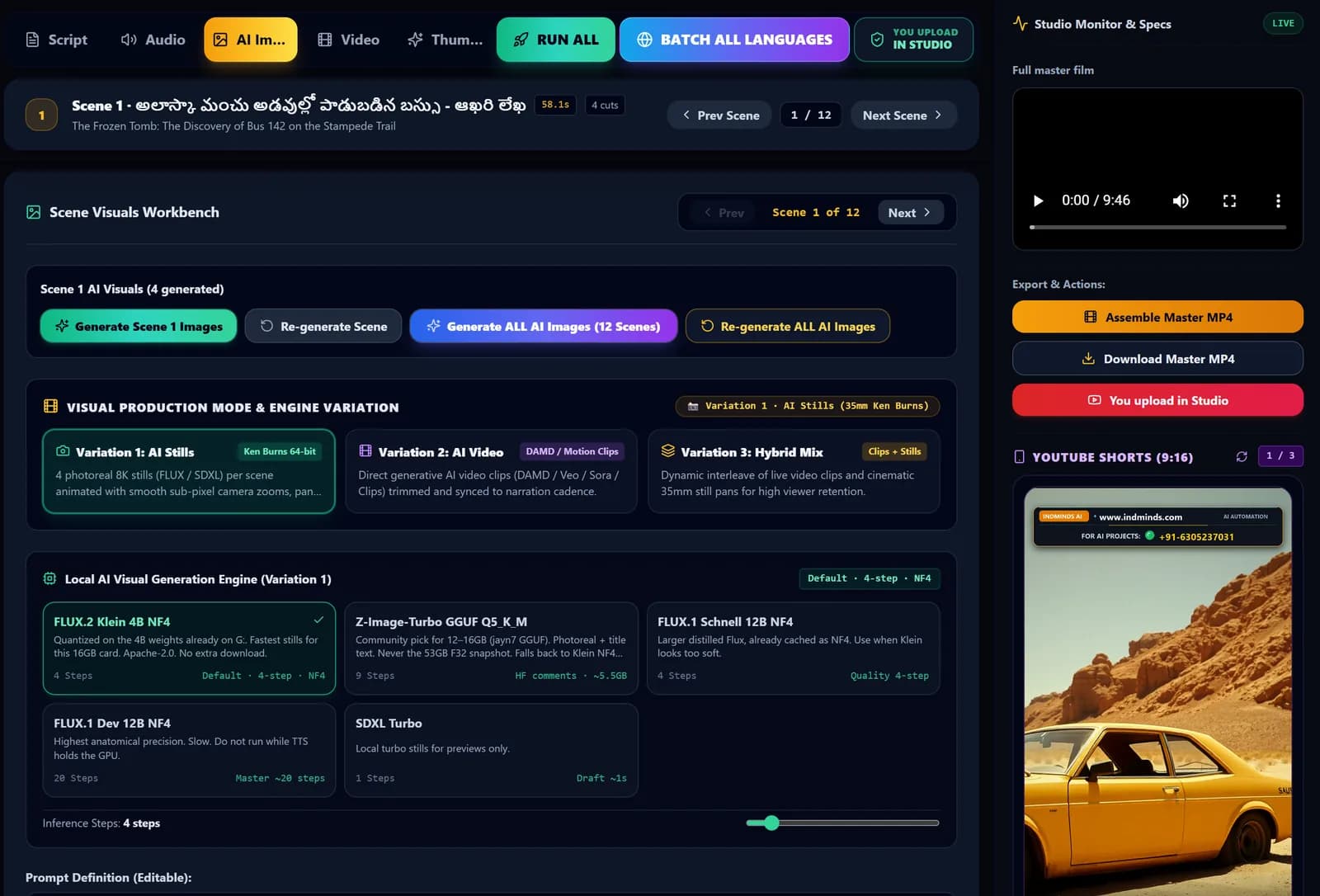
4. Image QC
A picture agent checks the script before drawing and locks recurring characters, then inspects every still afterwards. It runs on local Gemma with EmbeddingGemma, on Gemini Flash, or on Auto (Gemini first, local as fallback).
5. Narration and voice cloning
Every scene gets a voiceover, with voice cloning from a reference sample, a master voice, and pacing and loudness controls. Locally that's IndicF5 / F5-TTS; in the cloud, Gemini TTS or OpenAI TTS.
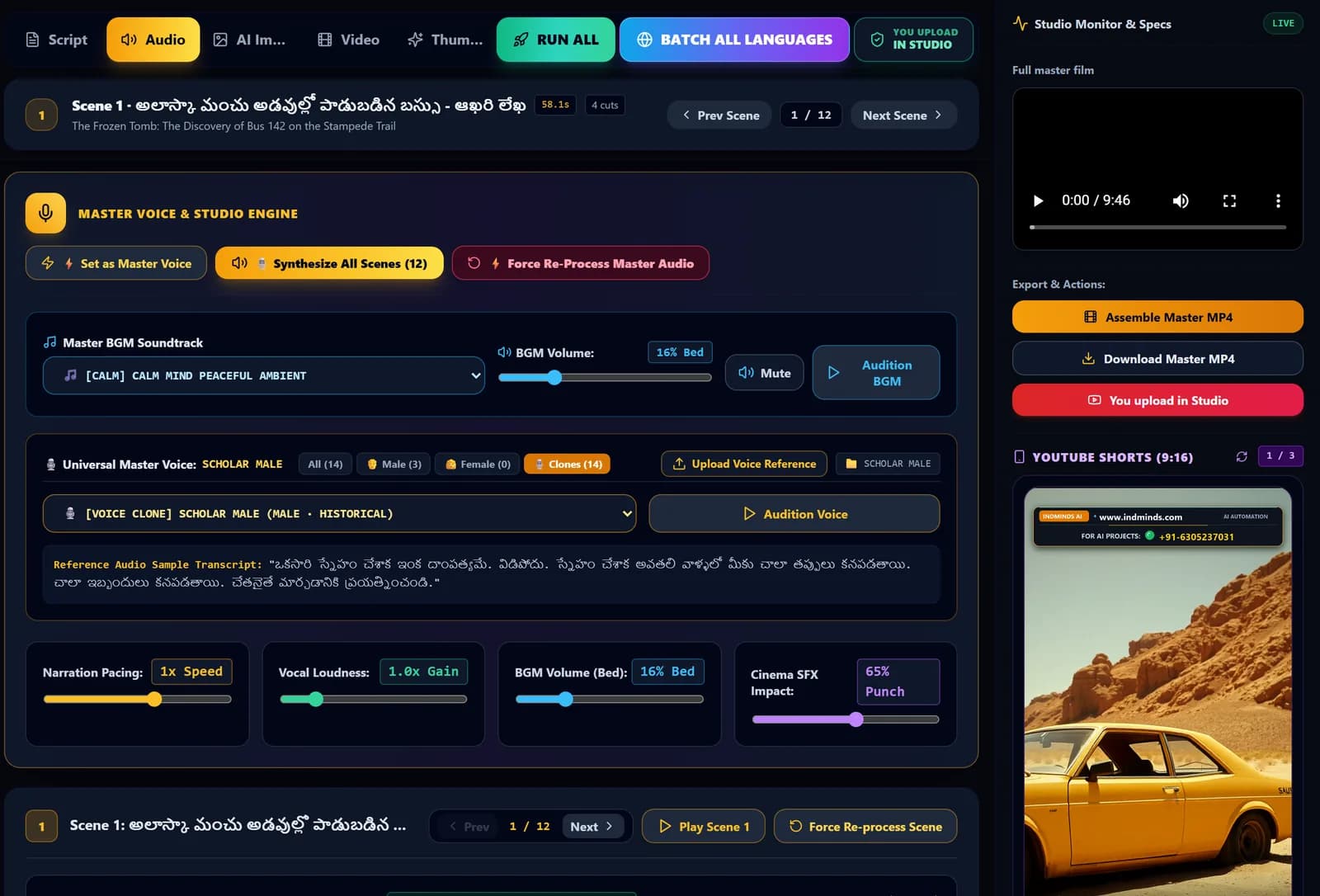
6. Music and sound design
One continuous music bed with automatic ducking under the voice, plus a sound-design agent that places ambience and effects from a library of 2,366 sounds. All mixed locally with FFmpeg.
7. Subtitles
Subtitles are timed to the audio itself (voice-activity detection plus silence snapping), not to the script, so they don't drift. Indic scripts render through HarfBuzz with Noto fonts, which avoids broken characters.
8. Scene-by-scene stitching
Each scene is rendered with camera motion, voice, music, effects and titles, then all scenes are joined into the master film using FFmpeg with NVIDIA NVENC. A stem monitor lets me play the voice, effects or music on its own when something sounds off.
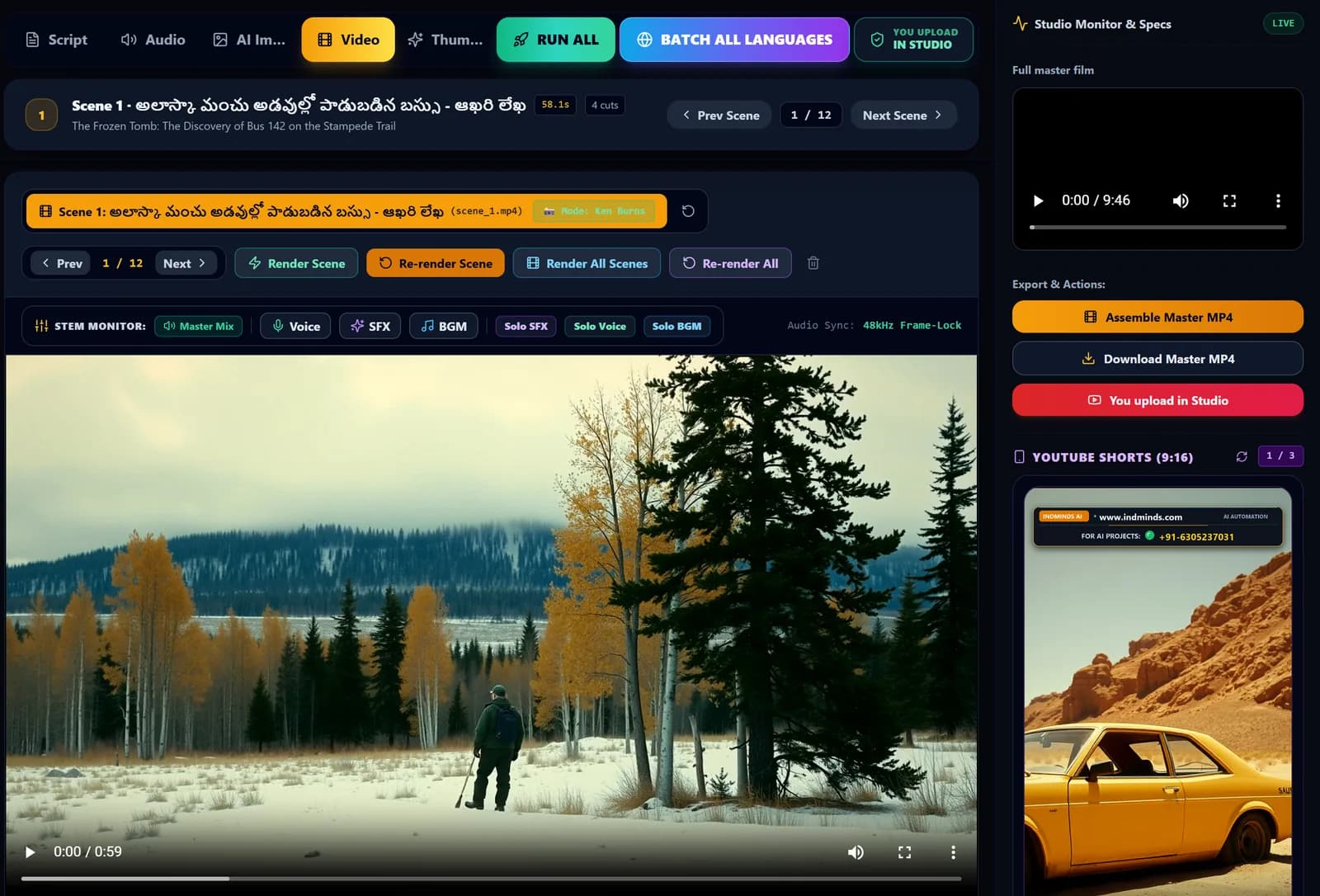
9. Shorts
From every film the studio picks 3 vertical Shorts of up to 56 seconds each.
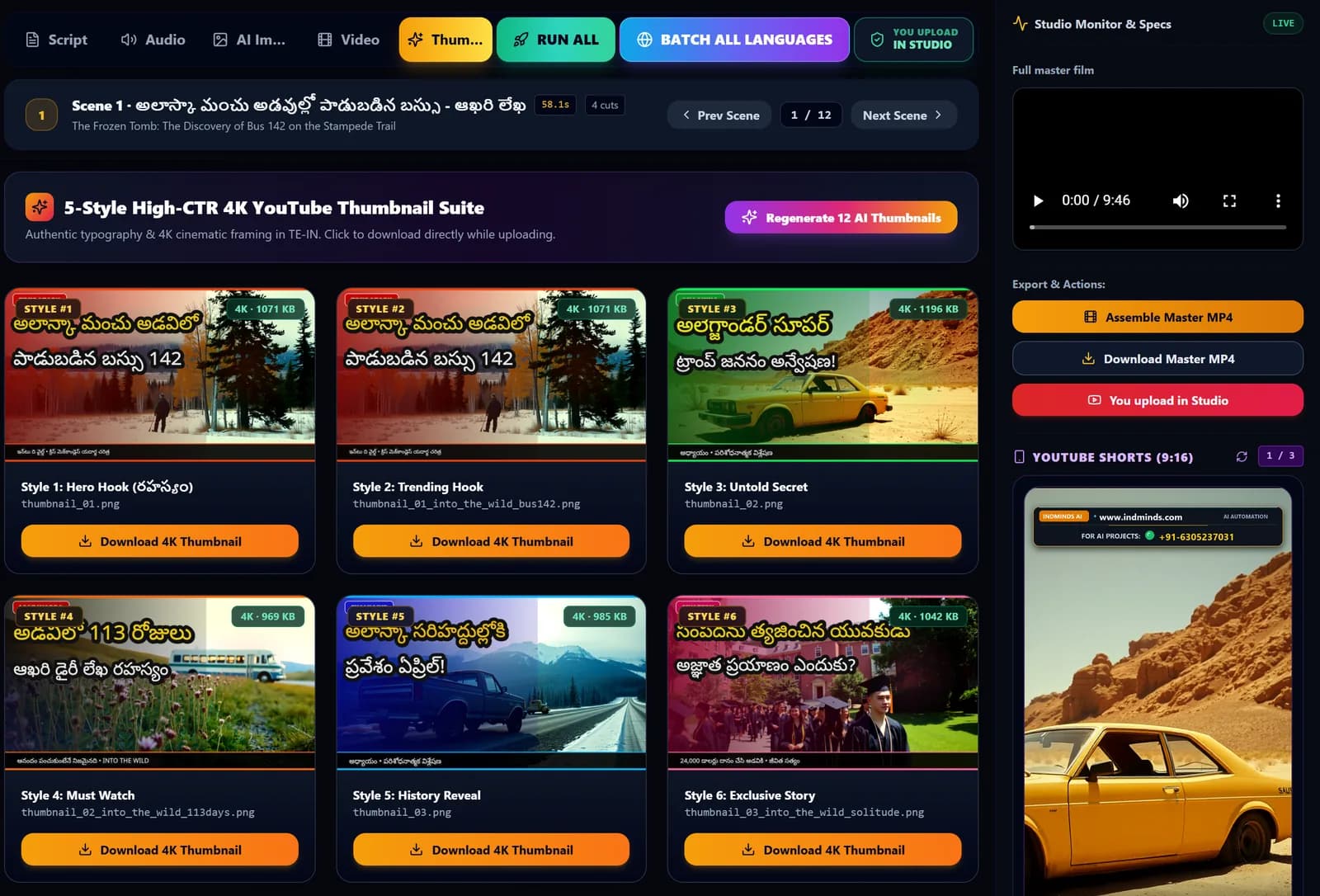
10. Thumbnails and SEO
12 thumbnails in 5 styles at 4K, plus a title, a description built from the story, chapter timestamps and tags.
11. Publishing (human in the loop)
I approve the film and upload it myself in YouTube Studio. A YouTube Data API uploader exists in the code, but it is off by default. I want a person to look at every video before the public does.
The hardware and the three ways to run it
The default is 100% local. The settings page literally says the studio runs "100% locally on your machine with zero cloud API costs". It was developed and benchmarked on an RTX 5070 Ti with 16 GB of VRAM. The image model is quantized to fit 16 GB with headroom, and the heavy models (FLUX and IndicF5) load one at a time and are cleared from VRAM after each batch, so they never fight for memory.
| Mode | What runs where | Who it suits |
|---|---|---|
| Free local | Gemma 4 (Ollama), FLUX, IndicF5 and FFmpeg on your own NVIDIA GPU | Anyone with a 16 GB card who publishes often |
| Hybrid | Pick local or cloud separately for script, images, voice and review | People who want a premium script model but free images and voice |
| Cloud | Gemini, OpenAI, Grok, Claude or OpenRouter via API keys | No GPU, or a laptop-only setup |
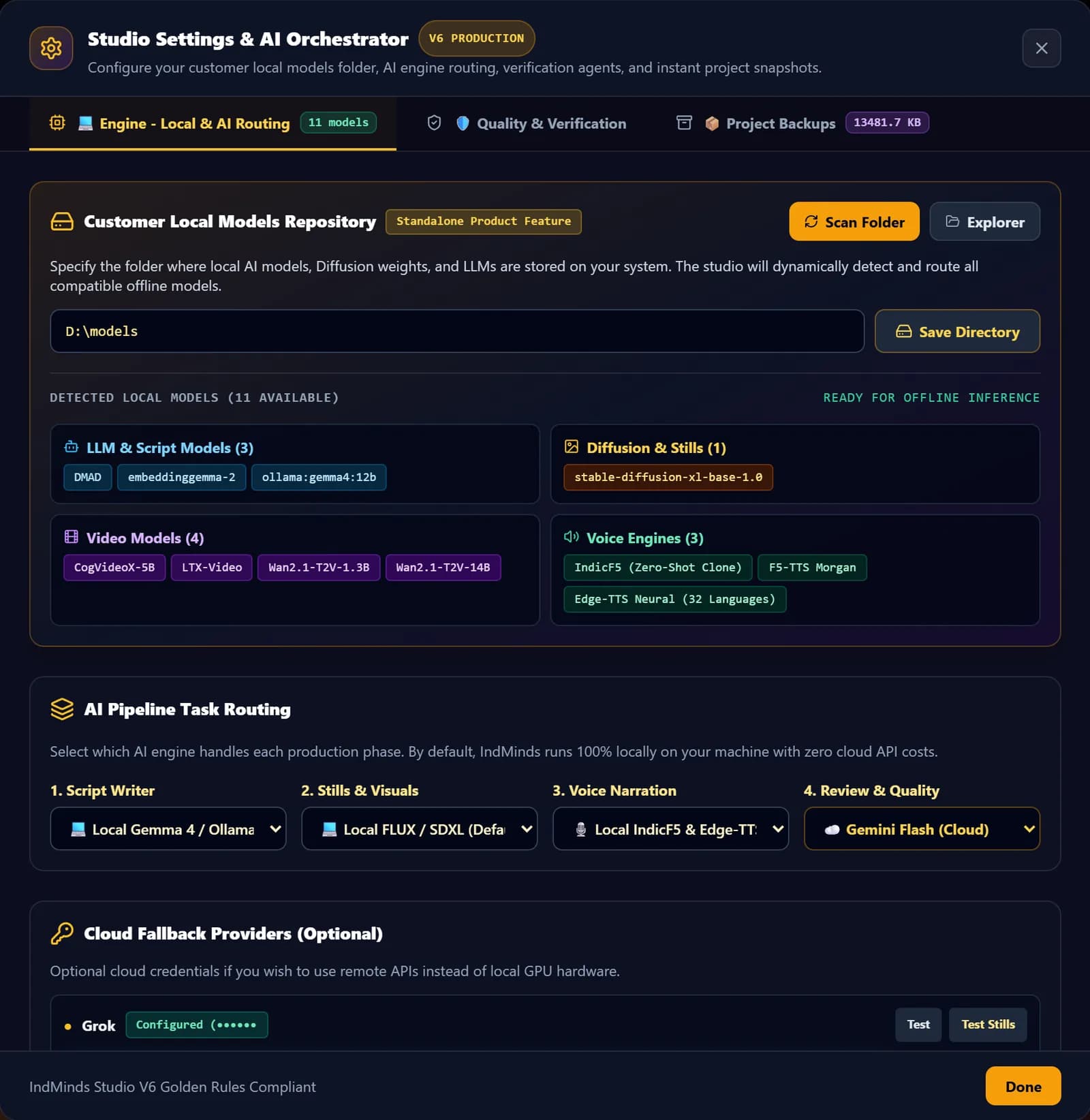
On the local setup the per-video cost is roughly the electricity. That matters when you publish regularly, because API bills scale with every regenerated image and every retried voice line. I compare the trade-offs in detail in free local AI vs paid APIs.
The quality agents (the part nobody shows)
Generating media is easy now. Catching the bad parts before viewers do is the hard part, and it's where most of my build time went.
The studio runs as a team of specialised agents: script, audio, image, music, intro/outro, video, thumbnail/SEO, Shorts, QA and review. Every stage has a Pre-Flight Guardrail that runs before generation and a Post-Generation Audit that runs after. When a check fails, the agent repairs the script, the prompts or the SEO instead of stopping the whole film.
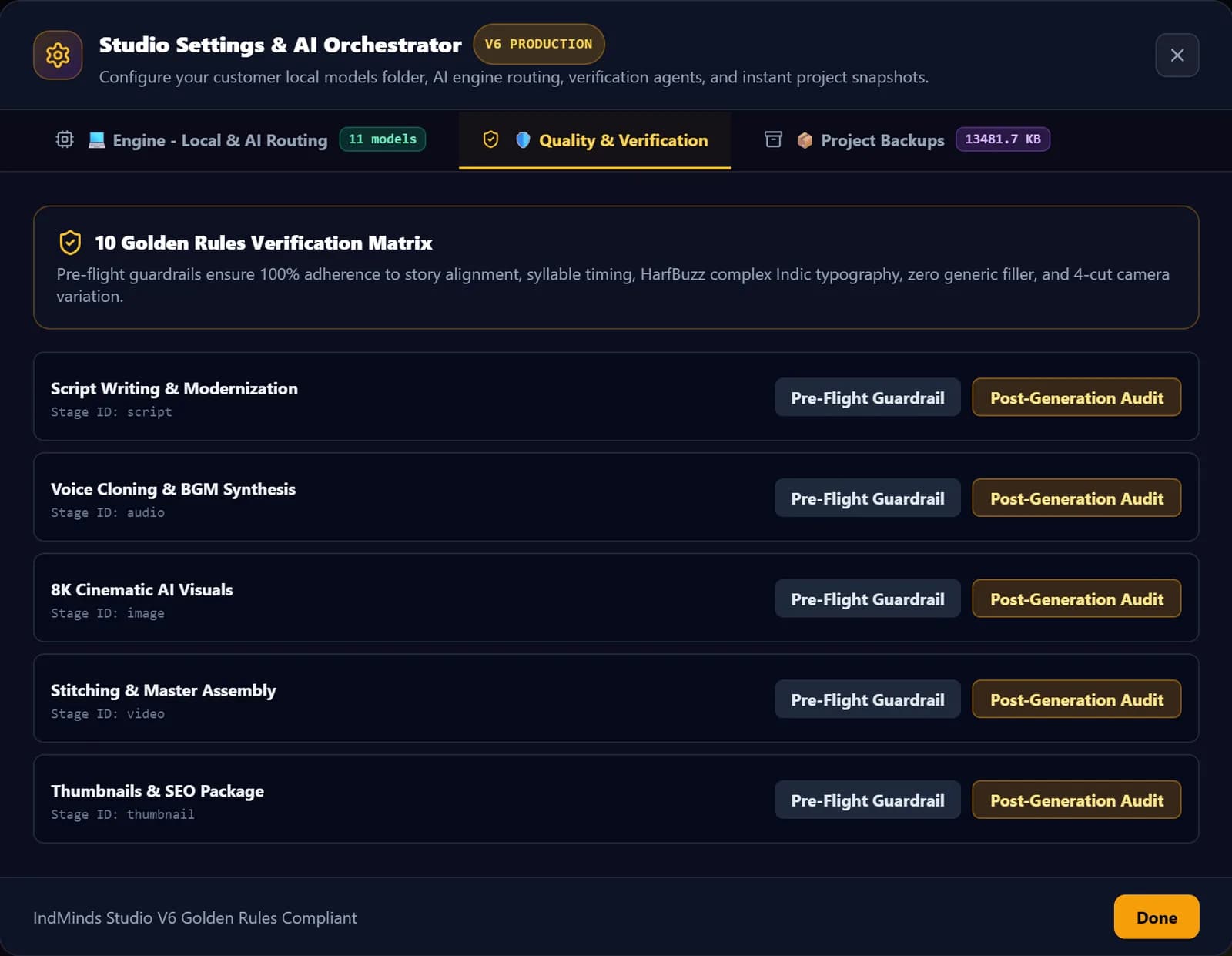
What those checks caught in practice:
- Character drift. Faces and clothes change between scenes unless recurring characters are locked before drawing.
- Extra objects. Watches, glasses and modern items in ancient scenes. Describing what should be there worked better than long "don't draw" lists.
- Repeated scenes. Repeats in the script become repeated images, so the script is checked for repeats before any image is drawn.
- Narration errors. Odd pauses and mispronounced names are caught by listening back to every file, not by trusting the script.
Built with Google Antigravity
I built the studio as one developer working with AI coding agents in Google Antigravity, alongside Gemini, Grok and Claude. All the agents follow a shared written rulebook: cache completed stages, load one GPU model at a time, never trust an exit code without checking the output file, follow Indic typography rules. Under the hood it's a Next.js dashboard driving a modular Python backend with PyTorch and Diffusers on CUDA, and FFmpeg for media.
That's the other lesson: AI-assisted development can produce a production pipeline. It's exactly what I teach in the weekend workshop.
What I'd tell you before you copy this
- Pick the series before the stack. A topic people are curious about, which they can't easily find in their language, matters more than any model choice.
- Invest in checks early. Automatic QC saves more time than a faster image model.
- Keep a human in the loop. Lock the script, read the QC report, approve the film, upload it yourself.
- Make every video clearly yours. YouTube's monetization policies target mass-produced, templated content. I explain what that means in can AI videos be monetized on YouTube.
- Don't chase my numbers. They're proof the process works, not a promise. Some weeks will be quiet.
Sources (official pages, checked Oct 19, 2026)
- YouTube channel monetization policies (inauthentic and reused content)
- Disclosing use of GenAI content on YouTube
- Bible Tales on YouTube
Frequently asked questions
Is the whole video made by AI?
The script, images, narration, music bed, subtitles, thumbnails and metadata are produced by the pipeline. A person picks the topic, checks and locks the script, reviews the quality reports, approves the final film and uploads it in YouTube Studio. Nothing is published automatically.
Do I need an expensive GPU to run this stack?
No. The free local mode is built for an NVIDIA RTX GPU with 16 GB of VRAM, but the same studio also runs in cloud mode with Gemini, OpenAI, Grok, Claude or OpenRouter, where you don't need a GPU for generation. Final stitching runs on your computer with FFmpeg either way.
Will I get the same views if I copy this setup?
Nobody can promise that. Views depend on your topic, packaging, consistency and YouTube itself. The numbers in this post are proof that the pipeline can produce videos people watch, not a forecast for your channel.
Does the studio generate AI video clips?
No. Each scene is built from AI still images with camera motion, narration, music, sound effects and titles. Generating video clips through APIs is only an experimental option in the code, so we don't sell it as a feature.
How many languages can it produce?
30 Indian and global languages. Each language gets its own script, voice files, subtitles and master video in a separate folder, so one translation never overwrites another.
Written by Vijay Allam, IndMinds, who builds and runs the AI video pipeline behind our Bible Tales channel and teaches IndMinds programs. Policies and exam details change; we link the official pages so you can check the current version.
Related posts
Newsletter
One useful AI email a week. No spam.
New posts, real numbers from our channel, and the next workshop and batch dates. Unsubscribe with one reply.
Prefer WhatsApp?
Ask a question or get batch dates on WhatsApp. We reply within one working day.