Free local AI on your own GPU vs paid APIs (Gemini, OpenAI, Grok, Claude): which should you use?
Running AI locally on a 16 GB NVIDIA GPU with Ollama, FLUX and open voice models vs paying for Gemini, OpenAI, Grok, Claude or OpenRouter APIs: cost, quality, privacy, setup and a simple decision guide, from a studio that runs both.
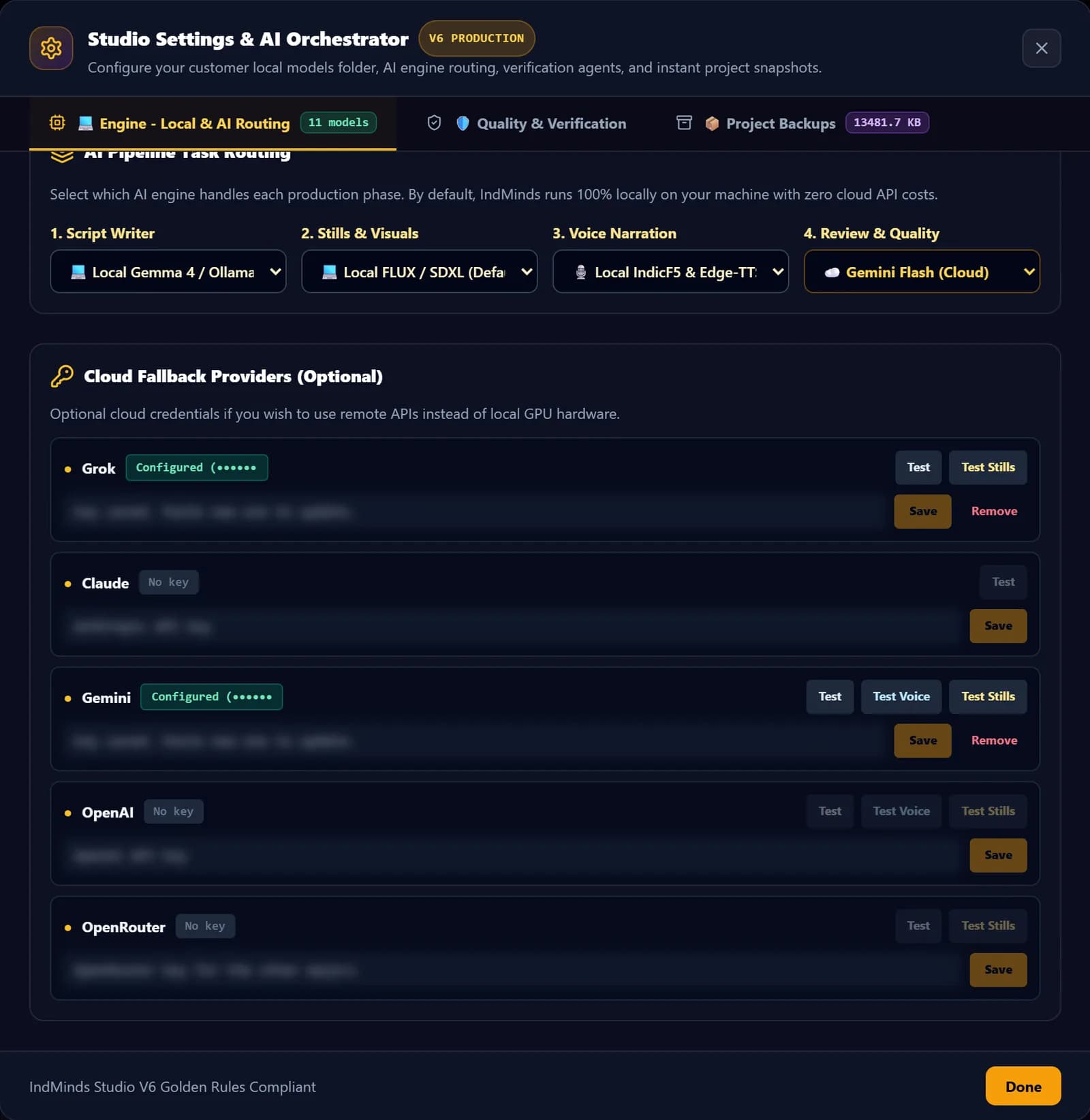
Every AI creator hits the same question: should I pay for APIs, or run models on my own GPU? I've built a studio that does both. By default it runs 100% locally, and every stage can be switched to Gemini, OpenAI, Grok, Claude or OpenRouter with an API key. The videos on our channel, which got 1,22,541 views in 7 days (Oct 11–17, 2026), came out of that studio.
Here's an honest comparison, without invented benchmarks or prices. Where a number matters (API pricing), I link the official page, because it changes.
Key takeaways
- Local = buy the GPU once, then near-zero cost per video, full privacy, more setup.
- Cloud = no hardware, top models on demand, but you pay per use and depend on the provider.
- A 16 GB NVIDIA GPU comfortably runs a full local video pipeline if you load one heavy model at a time.
- Hybrid (cloud for scripts, local for images and voice) is often the sweet spot.
What "local AI" actually means
Running AI locally means the model files sit on your computer and run on your own graphics card. Nothing is sent to a server. In our studio the local stack is:
| Job | Local model or tool |
|---|---|
| Script and review | Gemma 4 (12B) through Ollama, plus EmbeddingGemma for meaning checks |
| Images | FLUX.2 Klein 4B (4-bit), FLUX.1 Schnell/Dev, Z-Image-Turbo or SDXL |
| Voice | IndicF5 zero-shot voice cloning, F5-TTS |
| Video | FFmpeg with NVIDIA NVENC hardware encoding |
Point the studio at your models folder and it detects what's installed. On my machine it found 11 models.
What "cloud APIs" means
Instead of running the model, you send a request to a provider and pay for what you use (some have free tiers). Our studio's cloud settings support exactly five providers:
| Provider | Script | Images | Voice |
|---|---|---|---|
| Gemini (Google) | ✓ | ✓ | ✓ |
| OpenAI | ✓ | ✓ | ✓ |
| Grok (xAI) | ✓ | ✓ | – |
| Claude (Anthropic) | ✓ | – | – |
| OpenRouter (one key, many models) | ✓ | ✓ | – |
Head-to-head comparison
| Local on your GPU | Cloud APIs | |
|---|---|---|
| Upfront cost | A suitable NVIDIA GPU and PC | None |
| Cost per video | About zero (electricity) | Pay per request; grows with every retry |
| Quality | Very good for focused tasks with QC | Top models for complex reasoning |
| Speed | Depends on your card; one heavy model at a time | Fast, scales on demand |
| Privacy | Everything stays on your machine | Data goes to the provider under their terms |
| Setup | Drivers, models, memory management | An API key |
| Offline | Works offline | Needs internet |
| Lock-in | None | Depends on provider pricing and policies |
The cost row deserves a closer look. In a real pipeline you don't generate each image once; you regenerate failed frames, retry voice lines and rewrite scenes. Locally, a retry costs a few seconds of GPU time. On an API, every retry is billed. That's the main reason our default is local.
Running AI on your own GPU: what 16 GB gets you
Our studio was developed and benchmarked on an RTX 5070 Ti with 16 GB of VRAM. Three engineering choices make a full pipeline fit:
- Quantization. The default image model runs in 4-bit (NF4), sized to "fit 16 GB with headroom".
- One heavy model at a time. FLUX and IndicF5 never sit in GPU memory together. Each loads, finishes its batch and is cleared.
- Cache completed stages. If something fails halfway, the pipeline resumes instead of regenerating everything.
Choosing a GPU
- NVIDIA is the practical choice: most open image and voice tools target CUDA first.
- VRAM matters more than raw speed. It decides which models fit. 16 GB is our recommended target for a full video pipeline.
- Smaller cards can still run language models through Ollama and smaller image models, with more compromises.
- Check current prices yourself; GPU prices in India move a lot.
Running language models with Ollama
Ollama is the simplest way to run open language models locally: install it, pull a model, and your apps talk to it on your own machine. We use it for scripts and reviews. A 12B model like Gemma 4 is a good balance of quality and speed on a 16 GB card.
Running image models locally
FLUX models run through PyTorch and Diffusers on CUDA. Use a quantized version on 16 GB, and generate scenes in batches rather than loading and unloading for each image.
The hybrid setup most people should start with
Each stage in our studio (script writer, stills, voice, review) can be set to local or cloud independently. A popular mix:
- Script: a strong cloud model (for example Claude or Gemini) for long, coherent stories.
- Images: local FLUX, because images are where retries pile up.
- Voice: a local cloned voice for a consistent narrator.
- Review: Gemini Flash as the AI reviewer, with local as fallback.
Final stitching always runs on your own machine with FFmpeg, so even full cloud mode doesn't need a GPU for rendering.
Decision guide
| Your situation | Recommendation |
|---|---|
| You publish weekly or more and have (or will buy) a 16 GB NVIDIA GPU | Local first, cloud as fallback |
| Laptop only, testing whether YouTube is for you | Cloud, using free tiers where available |
| You want the best scripts but control costs | Hybrid |
| Client or confidential material | Local, with commercially licensed models |
| You sell setups to clients | Use models whose licences allow commercial use |
Getting started locally in an afternoon
- Update your NVIDIA driver and check that your card is detected.
- Install Ollama, pull a mid-sized model and ask it for a 12-scene script outline.
- Install FFmpeg and join a few images and an audio file into a test MP4.
- Add an image model (a quantized FLUX build) once the first three work.
- Watch GPU memory while you work. If you run out, close the model you aren't using before loading the next one.
A note on licences
"Free" doesn't always mean "free for commercial use". Some popular open image and voice models are released for non-commercial use only. For your own experiments that may be fine; for monetized or client work, read each model card. Our client setups use models licensed for commercial use, checked before handover.
Bottom line
If you're serious about publishing regularly, local AI on a 16 GB NVIDIA GPU pays off through near-zero cost per video, privacy and no lock-in. If you're not ready for hardware, cloud APIs get you started today. The best part of a well-built pipeline is that you don't have to choose forever: switch each stage when it makes sense.
See how all of this fits into one studio in How I got 1.22 lakh views in 7 days.
Sources (official pages, checked Oct 19, 2026)
Frequently asked questions
How much VRAM do I need to run AI locally?
It depends on the models. Our full video studio (Gemma via Ollama, a quantized FLUX image model and IndicF5 voice cloning) is built for an NVIDIA RTX GPU with 16 GB of VRAM, loading one heavy model at a time. Smaller cards can run smaller or more heavily quantized models, more slowly.
Can I run AI locally without a GPU?
Small language models can run on a CPU, but image generation and voice cloning are very slow without a GPU. If you don't have a suitable NVIDIA card, use cloud APIs for generation; final video assembly with FFmpeg still runs fine on an ordinary computer.
Is the Gemini API free?
Google offers a free tier for the Gemini API with rate limits, and paid tiers above that. Limits and prices change, so check Google's official pricing page before you plan around it.
Are local models as good as GPT, Gemini or Claude?
For many focused tasks, such as a 12-scene script, image generation or narration, open models are good enough, especially with quality checks. The largest cloud models are usually stronger at long, complex reasoning. That's why a hybrid setup is popular.
Is my data private with local AI?
With local models your prompts, scripts and voice samples stay on your machine. With cloud APIs they're sent to the provider, under that provider's terms. For client work or sensitive material, local is the simpler privacy story.
Written by Vijay Allam, IndMinds, who builds and runs the AI video pipeline behind our Bible Tales channel and teaches IndMinds programs. Policies and exam details change; we link the official pages so you can check the current version.
Related posts

Newsletter
One useful AI email a week. No spam.
New posts, real numbers from our channel, and the next workshop and batch dates. Unsubscribe with one reply.
Prefer WhatsApp?
Ask a question or get batch dates on WhatsApp. We reply within one working day.