A reference architecture for enterprise GenAI on Google Cloud: Vertex AI, Gemini, vector search, security and LLMOps
A layer-by-layer reference architecture for enterprise generative AI on Google Cloud: Gemini on Vertex AI, vector search options, IAM and VPC Service Controls, guardrails and LLMOps.
Most enterprise GenAI projects don't fail on model quality. They stall in security review, break when a second team tries to reuse them, or become too expensive to scale. A clear reference architecture prevents all three. This post sets out a layer-by-layer design on Google Cloud that we use as a starting point, with the official documentation for each building block so you can verify the details yourself.
Key takeaways
- Design in six layers: experience, orchestration, models, data & retrieval, security & governance, and LLMOps.
- Pick the vector store where your data already lives (Vertex AI Vector Search, BigQuery, AlloyDB) or let RAG Engine manage it.
- Security is identity + perimeter + keys + logs + content screening, and document-level ACLs in retrieval.
- LLMOps means evaluation gates in CI/CD, monitoring quality and cost, and planned model upgrades.
The architecture at a glance
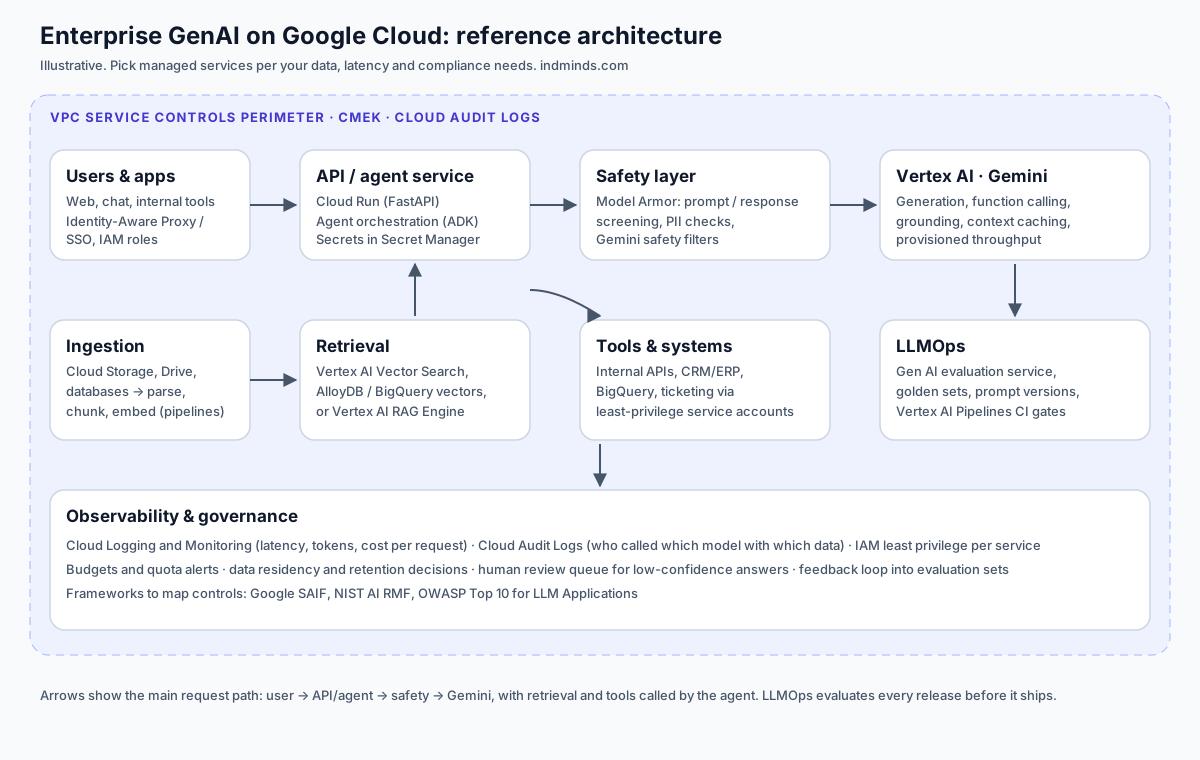
| Layer | Purpose | Typical Google Cloud services |
|---|---|---|
| Experience | Where users and systems interact | Web app, chat, internal portals, APIs |
| Orchestration | Business logic, agents, tool calls | Cloud Run, Vertex AI Agent Engine, ADK |
| Models | Generation, embeddings, ranking | Gemini and other models on Vertex AI |
| Data & retrieval | Grounding in enterprise data | Vertex AI Vector Search, RAG Engine, BigQuery, AlloyDB, Cloud Storage |
| Security & governance | Protect data and control access | IAM, VPC Service Controls, CMEK, Secret Manager, Model Armor, Audit Logs |
| LLMOps | Quality, reliability, cost | Gen AI evaluation service, Vertex AI Pipelines, Cloud Monitoring/Logging |
Google also publishes its own reference designs, including a RAG-capable generative AI application using Vertex AI and broader AI and ML architecture guidance. Use them alongside the Google Cloud Architecture Framework when you write your design document.
Layer 1: Experience
Keep the user-facing layer thin. It should handle authentication (your corporate identity provider), session state, streaming responses, citations and a feedback control (thumbs up/down plus a reason). Feedback is cheap to collect and becomes the fuel for evaluation later.
Layer 2: Orchestration and agents
This is your application code: prompt assembly, retrieval calls, tool calls and business rules.
- Cloud Run is a simple default for containerised APIs that scale to zero (what is Cloud Run).
- Vertex AI Agent Engine is a managed runtime for deploying and scaling agents (Agent Engine overview).
- Agent Development Kit (ADK) is Google's open-source framework for building agents (ADK docs); LangChain/LangGraph are common alternatives.
- Function calling lets Gemini request structured tool calls that your code executes (function calling). Your code, not the model, decides whether a call is allowed.
- Model Context Protocol (MCP) is an open protocol for connecting models to tools and data sources (modelcontextprotocol.io), useful when many agents need the same tools.
Design rule: side-effect actions (sending, updating, deleting, paying) need explicit authorisation checks and, usually, human approval.
Layer 3: Models on Vertex AI
Vertex AI provides Gemini models plus a catalogue of Google, partner and open models through Model Garden (Google models on Vertex AI). Architecture decisions here:
- Model routing: use a smaller, faster model for classification, routing and grading; reserve larger models for complex reasoning. Make the model name configuration, not code.
- Structured output: ask for JSON against a schema so downstream code is reliable (control generated output).
- Grounding: connect answers to your data or to Google Search where appropriate (grounding overview).
- Embeddings: pick one embedding model per index and record its version; changing it means re-embedding (text embeddings).
- Capacity: for steady, high-volume workloads, evaluate Provisioned Throughput.
- Cost and latency: reuse repeated long context with context caching.
Model versions change over time. Pin versions in production and upgrade through your evaluation gate (see LLMOps below).
Layer 4: Data and retrieval
Choose the vector store based on where the source data lives and who maintains it:
| Option | Good fit | Notes |
|---|---|---|
| Vertex AI Vector Search | Large-scale, low-latency similarity search | Managed ANN service; supports filtering |
| Vertex AI RAG Engine | Teams that want a managed RAG pipeline | Handles ingestion, chunking and retrieval |
| BigQuery vector search | Data already in BigQuery; analytics + RAG | Use SQL alongside embeddings |
| AlloyDB AI | Operational data in PostgreSQL | Vectors next to transactional rows |
Whatever you choose:
- Keep the raw documents in Cloud Storage (or the source system) as the system of record; the index is derived and rebuildable.
- Store metadata with every chunk: source, section, updated date, and access-control groups.
- Combine keyword and vector retrieval, then re-rank (ranking API).
- Build an incremental ingestion pipeline so updated documents are re-indexed without a full rebuild.
Layer 5: Security and governance
Security reviewers will ask about identity, network, encryption, logging and content risk. Have an answer for each:
- Identity (IAM): a dedicated service account per component with least-privilege roles; no user keys in code (IAM overview).
- Perimeter: place sensitive projects inside VPC Service Controls to reduce data exfiltration risk.
- Encryption keys: use customer-managed encryption keys (CMEK) where your policy requires control of keys, and check which services support CMEK.
- Secrets: API keys and credentials in Secret Manager.
- Audit: enable and retain Cloud Audit Logs, including data access logs where needed.
- Content screening: screen prompts and responses for prompt injection, jailbreaks and sensitive data with Model Armor, and configure Gemini safety filters.
- Document-level access: enforce ACL filters in the retrieval query so users can only retrieve what they're entitled to read.
- Responsible AI: review Google's responsible AI guidance for Vertex AI and map risks with frameworks such as Google SAIF, the NIST AI RMF and the OWASP Top 10 for LLM Applications.
For Indian organisations handling personal data, also involve your legal or privacy team on obligations under India's data protection framework (MeitY data protection framework).
Layer 6: LLMOps
LLMOps is what keeps the system good after launch.
- Version everything: prompts, model names and versions, embedding model, chunking settings, and evaluation sets live in Git.
- Evaluation gate in CI/CD: each change runs the evaluation set with the Gen AI evaluation service or your own harness; releases below threshold are blocked. Choose metrics deliberately (determine evaluation).
- Pipelines: automate ingestion, re-embedding and batch evaluation with Vertex AI Pipelines.
- Monitoring: dashboards for latency, error rate, tokens and cost per request, retrieval hit rate, refusal rate and user feedback.
- Model upgrades: run the new version in shadow or on a slice of traffic, compare on the evaluation set, then switch.
- Feedback loop: negative feedback goes into a review queue; reviewed cases are added to the evaluation set.
A minimal request path
# Simplified request path (pseudocode). Each function maps to a layer above.
def handle(request, user):
    screen_input(request.text)                         # Model Armor / custom checks
    route = classify(request.text, model=SMALL_MODEL)  # cheap routing call
    passages = retrieve(request.text, acl=user.groups) # vector search + ACL filter
    passages = rerank(request.text, passages)[:6]
    answer = generate(request.text, passages, model=MAIN_MODEL, schema=ANSWER_SCHEMA)
    screen_output(answer, passages)                    # faithfulness, PII, policy
    log_trace(user, route, passages, answer)           # tokens, latency, cost, sources
    return answer
Design review checklist
| Question | Good answer looks like |
|---|---|
| Who can see which documents? | ACL metadata enforced in the retrieval query, with tests |
| What happens when the model is wrong? | Citations, "I don't know" fallback, feedback loop |
| How do we know a change didn't break quality? | Versioned evaluation set as a CI gate |
| What does one request cost? | Per-request token and cost logging, with alerts |
| How do we upgrade the model? | Pinned versions, shadow evaluation, staged rollout |
| Where are secrets and keys? | Secret Manager; CMEK where policy requires |
Go deeper
Our AI Architect & Cloud Master Track takes you through these layers on Google Cloud: Gemini APIs, Vertex AI Search and Vector Search RAG, Agent Builder and ADK, Gemini multimodal pipelines, Model Armor security and LLMOps, with enterprise capstones. Live on Mon & Fri 10:00–11:30 AM plus Sat 12:00–1:30 PM IST, for 12 weeks.
Sources (official pages, checked Oct 29, 2026)
- Vertex AI documentation and Generative AI on Vertex AI overview
- Google Cloud: RAG-capable gen AI app using Vertex AI
- Vertex AI Vector Search, RAG Engine, BigQuery vector search, AlloyDB AI embeddings
- VPC Service Controls, IAM, CMEK, Cloud Audit Logs
- Model Armor overview
- Vertex AI Agent Engine and ADK documentation
- Google Cloud Architecture Framework
Frequently asked questions
What are the main layers of an enterprise GenAI architecture on Google Cloud?
A practical split is: experience (web, chat, APIs), application and orchestration (for example on Cloud Run or Vertex AI Agent Engine), models (Gemini and others on Vertex AI), data and retrieval (vector search, BigQuery, AlloyDB, Cloud Storage), security and governance (IAM, VPC Service Controls, CMEK, Model Armor, audit logs), and LLMOps (evaluation, pipelines, monitoring).
Which vector database should I use on Google Cloud?
It depends on where your data already lives and your scale. Vertex AI Vector Search is a managed, high-scale option; BigQuery vector search suits analytics data already in BigQuery; AlloyDB for PostgreSQL with vector support suits operational data in Postgres; Vertex AI RAG Engine manages the retrieval pipeline for you. Evaluate on your own queries.
How do I keep enterprise data private when using Gemini on Vertex AI?
Use least-privilege IAM, VPC Service Controls perimeters around sensitive projects, customer-managed encryption keys where required, audit logging, and review Google Cloud's published data governance and responsible AI documentation for the services you use. Enforce document-level access control in your retrieval layer.
What is LLMOps?
LLMOps is the set of practices for running LLM applications reliably: versioning prompts and evaluation sets, automated evaluation in CI/CD, monitoring quality, latency and cost in production, managing model version upgrades, and feeding user feedback back into evaluation.
Should I build agents with ADK or a third-party framework?
Both work on Google Cloud. Google's Agent Development Kit (ADK) integrates closely with Gemini and Vertex AI Agent Engine; frameworks such as LangChain or LangGraph are widely used and portable. Choose based on your team's skills, portability needs and the managed runtime you plan to deploy on.
Do I need Provisioned Throughput?
Only if you need reserved capacity for predictable, high-volume or latency-sensitive workloads. Many projects start on standard pay-as-you-go usage and evaluate Provisioned Throughput once traffic is steady and well understood.
Written by Vijay Allam, IndMinds, who builds and runs the AI video pipeline behind our flagship AI YouTube channel and teaches IndMinds programs. Policies and exam details change; we link the official pages so you can check the current version.
Related posts
Newsletter
One useful AI email a week. No spam.
New posts, real numbers from our channel, and the next workshop and batch dates. Unsubscribe with one reply.
Prefer WhatsApp?
Ask a question or get batch dates on WhatsApp. We reply within one working day.